Ripa
Hi Rern,
I use the original 7 inch display now i see when startup all kind of source code.
It dont look nice anymore.....
Ripa
klassikmann
@[deleted]
rern wroteHerbert, Ripa,
There is another update:
- Fix maintaining scroll position bug.
- Any changes made in Playlist reflect to all clients.
- Playlist always scroll current song to the top with 3 previous if any.
Please try and report.
rern
My problem
klassikmann wroteI think there is a problem in the Playback page. If I play something and use the "replace and play" feature of the Library page, then the old playlist is stuck until I refresh the browser contents. This is particularly annoying because the Library page forgets its actual position and starts with the root again.
looks resolved.
Thank you
Herbert
R101
Since this latest update, my 7" Android tablet displays a blank webpage. All seems OK on the PC.
rern
Ripa, R101,
Midori, the local RPi browser, and some browsers don't like a default variable syntax for functions which just added to the update.
It's fixed.
@[deleted] - How's the fix for sorting issue?
rern
R101
Thanks rern. Everything is working well now. The sorting issue was fixed by your previous update, so thanks again for that.
Ripa
Hi Rern,
everything seems to work perfect now.
is there a way to switch update off i have make an back up.
that way i first test the new version before i change the update.
thanks man for all the work...
Ripa
Hi Rern,
if i switch power off the display wich connected to the raspberry goes on and off
how can i fix this?
thanks
Ripa
Ripa
Hi Rern,
today i try to start the system up but it stays in an loop.
it still trying to start up.
so it works when you reboot the system, but when you use switch off it stays in the loop
Ripa
alecs123
Hello... I installed the UI enhancement, it works perfect on my Lenovo Android tablet along with the RuneAudio app for remote control. But on my Phone, Also an Android the same RuneAudio app I can't turn off the autohide behavior, and can't access the gear menu for all setup and config needs, is There a way to turn off autohide?
Thanks
rern
Ripa wrote
...
so it works when you reboot the system, but when you use switch off it stays in the loop
...
Reboot and Power Off will work correctly in next update.
alecs123 wrote
...
But on my Phone, Also an Android the same RuneAudio app I can't turn off the autohide behavior, and can't access the gear menu for all setup and config needs, is There a way to turn off autohide?
...
Just tap the top-right corner of the cover art or time knob. Tap the top of either ones to show overlay guides for all controls. No need for the top-bottom bars or buttons.
rern
Ripa
Hi Rern,
still have the problem that when i startup the system indicate 3 usb instead of only one the same with network
he seems to remember if you have use 3 usb.
thanks man for all the work...
Ripa
alecs123
Thanks rern... I knew there should be something I was missing... very cool!
R101
Hi rern,
I have noticed that the cursor does not scroll down the playlist as the tracks are played unless the page is refreshed.
alecs123
I have one more questions, a dumb one if you like, but where can I find music library and the cue fot this enhancement if the buttons are hidden?
Thanks again
rern
@R101,
Good notice. A fix in next update.
@alecs123,
Just swipe left / right.
From WikipediA:
Carl Sagan, in his work The Demon-Haunted World: Science as a Candle in the Dark, said: "There are naive questions, tedious questions, ill-phrased questions, questions put after inadequate self-criticism. But every question is a cry to understand the world. There is no such thing as a dumb question".
Obviously, a user guide is needed. Anyone interested?
Ripa
Hi Rern,
is there a way to add Oled display into the settings or is this too much to ask
sometime i think to add this nice oled display WEH001602BLPP5N00001
thanks for your help
alecs123
Just wanted to write and say thanks to rern and all who contributed to runeaudio...
This is working almost perfect for me. FWIW I was getting some sloppy performance, seemed that network connection was dropping often, although the raspberry is hard wired. Web interface had slow response times, etc. I tried everything but at some point everything was back to a degraded performance, last thing I did was to get a new SD card (16GB class 10) and BAM! that did the trick...
Now I have a system that works real good... Uninstalled the Extended Characters RuneUI fonts as some lines with error showed...
Now, the only thing that is still miss and hit is loading the library, takes longer than it takes without the user interface, maybe my folder structure needs to get better work (it's a network drive WD my cloud 2TB)
anyway, thanks again for all this work
Ripa
Hi Rern,
I found a bug.
Connected to wifi swich from MPD to spotify DLNA that works perfect. When i stop Spotify and change from Spotify to MPD it stays in Spotify. I cannot find the ip address on my phone.
If i select in the library the usb drive then it swich to MPD and the music is back.
Regards
Ripa
Hi Rern,
FIY
When i play with bubble upnp i see on the screen below the track
the address instead of the artist name.
you see now an VU meter not the picture off the album can you make this optional?
spotify is correct
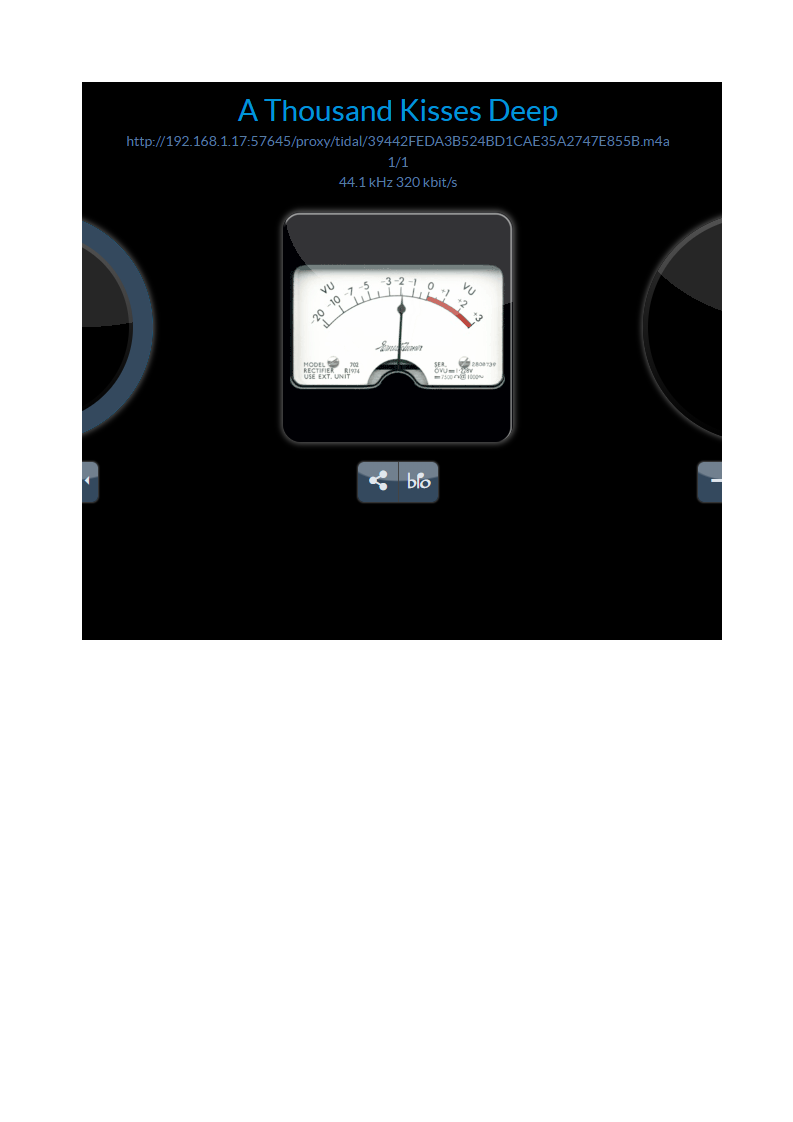
- rune.png (57.77 KiB) Viewed 2209 times
thanks
alecs123
I've been using addons and the enhanced interface almost without issues for about a month now. The only thing is that library seems to get stucked when trying to load tracks inside a folder. If the foler contains other folders then library loads fine, it's only when displaying tracks files. Rescanned and rebuilt sources, but no success, both usb and network mounts.
Thanks
aleka
I've made a multi zone system with 3 x Rpi3B+ and USB Dante interfaces which is all working well. I'd like to be able to make the RuneAudio logo link to the url of my DSP control page but it needs to be a different address for each player and I can't work out how to make it work, if they used all the same url then I add it into the header.php file and it worked no worries but I need each player to be different.
I'm guessing I still need to change something in the templates/header.php file but I need to somehow add information that identifies each player to the UI. My browser has an inspect elemant option when I right click and I can see that there is a number added to links but i don't know how or where it gets this from.
Any help greatly appreciated.
I'm running version 0.4_20180629_SC_Pi3B+_v3_tml3nr on Rpi3B+ hardware and enhanced_ui addon installed.
Thanks
