Midnight wroteMidnight wroteUsing the "cover.[jpg|png]" in the album folder would be great

It could be done like this:
In nginx.conf add a proxy for the covers to server1 section:
location /covers {
proxy_pass http://localhost:83/;
}
Then add another server section that only serves images from the mpd library dir:
#start server4 section [/covers]
server {
listen 83;
root /mnt/MPD;
location ~* \.(jpg|png|jpeg|bmp) {
expires 7d;
}
location / {
deny all;
}
} #end server4 section
After that cover images should be available on a url like this (depending on your library structure):
http://runeaudio/covers/my-library/a/adramelch/1988%20-%20irae%20melanox/cover.jpg
Following up on my tests of
Android MPD clients on BlackBerry 10, I started to wonder how to get MPDroid to show cover art. Midnight's solution works perfectly.
So in order to display cover art in MPDroid (regardless if you're on Android or BB10), first follow Midnight's steps above to make the RuneAudio webserver able to serve cover art. (It's too late in the night for me to test if the location section could be added directly to the server running on port 80, maybe you can answer that Midnight?)
MPDroid only supports one specific filename for the cover art. You will need a cover file in each directory and it has to have the same name throughout your library. In these examples I'm using 'cover.jpg', you may have called yours 'folder.jpg' or something else. Substitute 'cover.jpg' in the steps below to suite your naming convention.
Next, start MPDroid on your phone or tablet.
Go into 'Settings' -> 'Cover art settings'. Here you should tick 'Cache cover art' and 'Download local cover art':

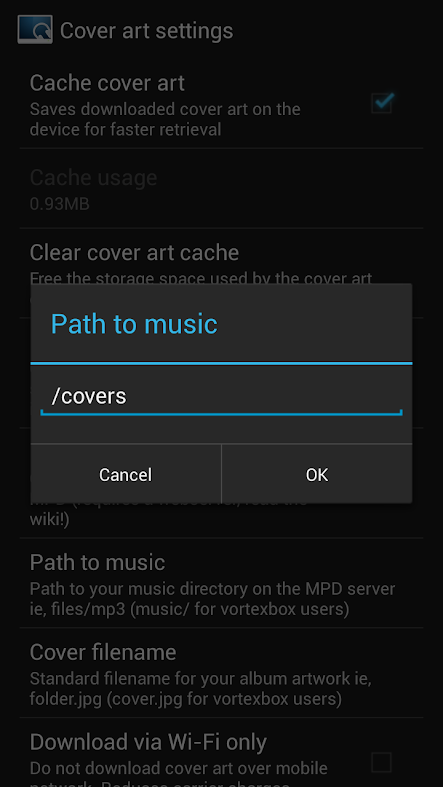
Now, select 'Path to music' and write '/covers' as shown below:
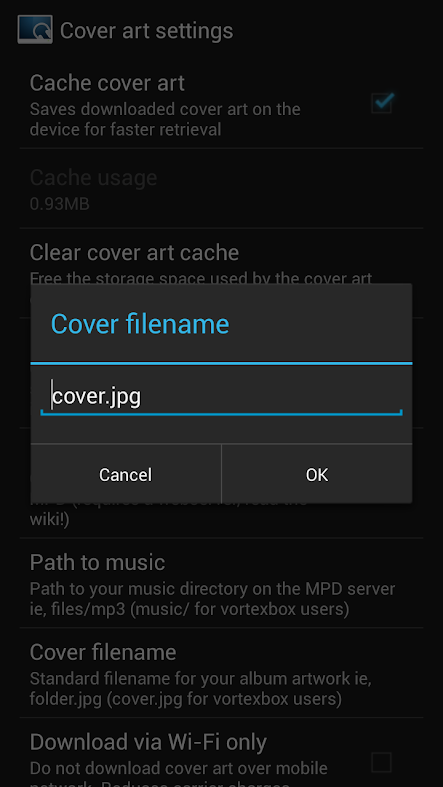
This is where your naming convention comes in. As I said, all my cover art files are called 'cover.jpg'. So I click on 'Cover filename' and write 'cover.jpg':
Finally, click 'Clear cover art cache' and MPDroid will be showing your local cover art. (Don't know why/if this is needed, but I had to in order to get cover art to work...)
To make sure it works, I copied a bogus cover art picture into one of my albums. And voila!

(Edit: Added picture to show that MPDroid really uses 'cover.jpg'.)


