rern wrote
There's a plus icon at the top of the page you selected the SSID.
Static IP address for devices should be done and managed at the router, not at each device. Search for "assign static ip to a device" for explainations.
rern
Hi Rern,
Thanks very much for your response - however I think that there may be a problem with setting a static IP address for a Wi-Fi device.
I did the following:
Menu > Network
Clicked 'Scan' to the right of 'Wi-Fi'
Clicked the '+' sign at the top of the list of SSIDs
In the 'Add Wi-Fi' dialog box I clicked 'Static IP'
Filled in the SSID, IP address etc:
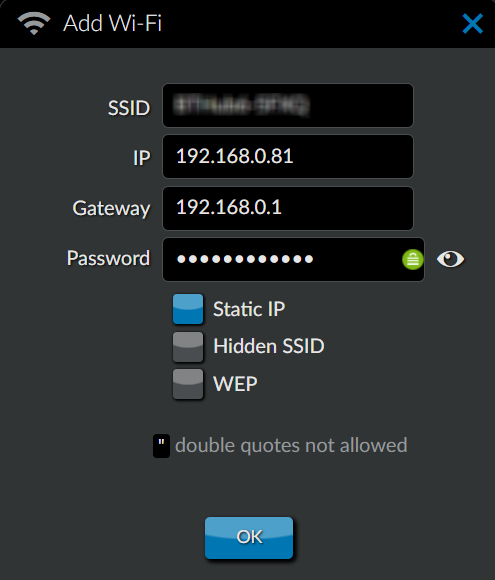
- Rune_Wifi-01.png (44.36 KiB) Viewed 2663 times
Clicked OK
The system connected to my wi-fi
Both LAN and Wi-Fi are listed under my interfaces:
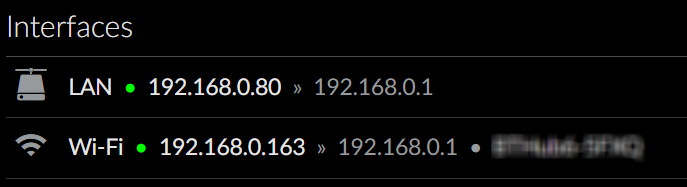
- Rune_Wifi-02.png (27.05 KiB) Viewed 2663 times
however this is a DHCP address, and as you can see it is not the static IP address that I specified.
This is the contents of the file /etc/netctl/<my-SSID> that was created:
Interface=wlan0
Connection=wireless
IP=dhcp
ESSID="<my-SSID>"
Security=wpa
Key="<my-key>"
Address=192.168.0.1
Gateway=undefined
Many thanks,
Vaughan


