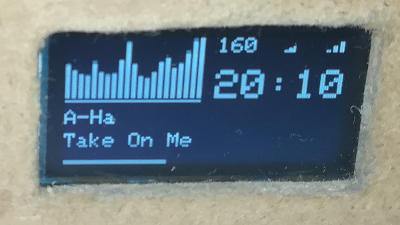
Hi Adrian. I will try to describe my procedure for installing mpd_oled on latest version (05b-10). There is a lot of your commands in this description, I followed your instructions

.
1. Wiring the display
I use two types of display.
1. On 1.3 inch I2C 4 OLED pin display the wiring was quite straight forward.
2. On 2.42 inch SPI/I2C 7 pin OLED display I had some troubles, the solution is described below
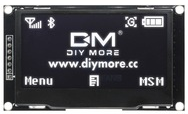
- 2019-05-21_094624.png (28.95 KiB) Viewed 11137 times
2. Display configuration
Add configuration in config.txt
# nano /boot/config.txt
dtparam=i2c1=on
dtparam=i2c_arm=on
dtparam=i2c_arm_baudrate=400000
Update libraries, install i2c-tools and create raspberrypi.conf file
# pacman -Syy
# pacman -Sy i2c-tools
# nano /etc/modules-load.d/raspberrypi.conf
Put those two lines in rasspberrypi.conf:
i2c-dev
i2c-bcm2708
3. Check if display is connected
You can now check if display is wired correctly and on which address it is:
# i2cdetect -y 1
You should get something like this. If there is no address (see UU 3c), there is something wrong.
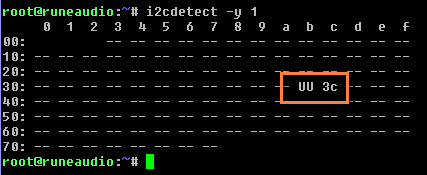
- 2019-05-21_094423.png (2.83 KiB) Viewed 11137 times
[/img]
4. Install and build CAVA Spectrum
# cd ~
# git clone https://github.com/karlstav/cava
# cd cava
# pacman -Sy autoconf automake clang make libtool fftw alsa-lib
# ./autogen.sh
# pacman -Sy llvm-libs
# pacman -Sy glibc
# pacman –Sy gcc
# CC=clang ./configure
5. Install and build MPD_OLED
# cd ~
# git clone https://github.com/antiprism/mpd_oled
# cd mpd_oled
# cp mpd_oled_fifo.conf /usr/local/etc/
# CC=clang CXX=clang++ PLAYER=RUNEAUDIO make
Lets try if it works:
# ./mpd_oled -o 6 -b 10 -g 1 -f 15
You should see something on display since CAVA spetcrum won't work yet.
6. Set MPD for sending data for CAVA algorithm
Becouse we cannot change MPD.conf there is another procedure, as described here:
#6329
We should make correction in runeaudio.php:
# nano /srv/http/app/libs/runeaudio.php
We should find two lines, somewhere around 2700 line of code:
2698 // write mpd.conf file to /tmp location
2699 $fh = fopen('/tmp/mpd.conf', 'w');
Now insert line
$output .= file_get_contents('/usr/local/etc/mpd_oled_fifo.conf'); between. The file /usr/local/etc/mpd_oled_fifo.conf exists, we copied it there in previous step. It should look like this now:
2698 // write mpd.conf file to /tmp location
2699 $output .= file_get_contents('/usr/local/etc/mpd_oled_fifo.conf');
2700 $fh = fopen('/tmp/mpd.conf', 'w');
Now reboot and check if it is working:
# cd mpd_oled
# ./mpd_oled -o 6 -b 10 -g 1 -s 25.0,5.0,0.0 -f 25
It should work now.
After updating new version (gitpull) you will probably have to repeat this step!!!
7. Set autostart
Once the display is working, edit the file mpd_oled.service to include your OLED command line:
# cd ~/mpd_oled
# nano mpd_oled.service
In the [Service] part there is your configuration:
1 [Unit]
2 Description=MPD OLED Display
3
4 [Service]
5 ExecStart=/usr/local/bin/mpd_oled -o 3 -r 25 -b 32 -g 1 -s 25.0,5.0,0.0 -f 25
6
7 [Install]
8 WantedBy=multi-user.target
You can check parameters with
# ./mpd_oled --help
and configure it as you like.
-------------------------------------------------------------
--------- ADD: Wiring 2.42 Display ----------------
-------------------------------------------------------------
It worked great on 1.3 inch display but it is quite small so I bought 2.42 OLED display. I had to solve two troubles:
1. It has SPI interface but it can be modified to I2C. I desoldered resistor from R4 and solder it on R3 and another one I bought on R5. It didn't work until I just put a wire (jumper) on R3 and R5. So do not bother with resistors, just unsolder one from R4 and connect contacts on R3 an R5 together.
2. I had a lot of issues with reset (RES) pin. I finally found a working solution. I connected reset pin on GPIO25 and have to set state in config.txt:
# nano /boot/config.txt
Set initial state for pin GPIO25
# Set GPIO25 to be an output set to 1
gpio=25=op,dh
That should do it. If you wire reset PIN on some other GPIO you define it in mpd_oled command line with switch -r (default is 25):
mpd_oled -o 3 -r 25 -b 32 -g 1 -s 25.0,5.0,0.0 -f 25
-------------------------------------------------------------
--------- ADD: Modifying c++ -----------------------
-------------------------------------------------------------
If you change something in c++ code (I don't need volume indicator so I managed to put there a shuffle indicator), you need to compile new code:
# CC=clang CXX=clang++ PLAYER=RUNEAUDIO make
and check...
# ./mpd_oled -o 6 -r 25 -b 32 -g 1 -s 25.0,5.0,0.0 -f 25