This fix is for all HiFiBerry DAC+ owners.
I've forgotten to include the right informations in our Audio Cards database (I'm very sorry for this mistake...).
Here is the solution:
1. Login via ssh into your RuneAudio player.
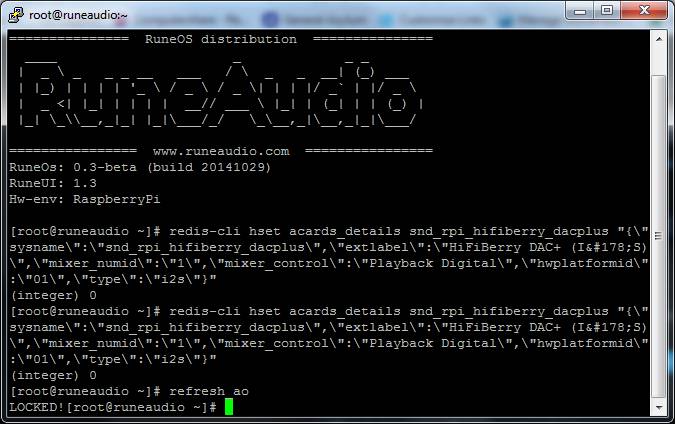
2. Execute this command to update the
acards_details Redis hash table.
redis-cli hset acards_details snd_rpi_hifiberry_dacplus "{\"sysname\":\"snd_rpi_hifiberry_dacplus\",\"extlabel\":\"HiFiBerry DAC+ (I²S)\",\"mixer_numid\":\"1\",\"mixer_control\":\"Playback Digital\",\"hwplatformid\":\"01\",\"type\":\"i2s\"}"
3. Execute this command to force a refresh of the
MPD audio output configuration.
refresh_ao
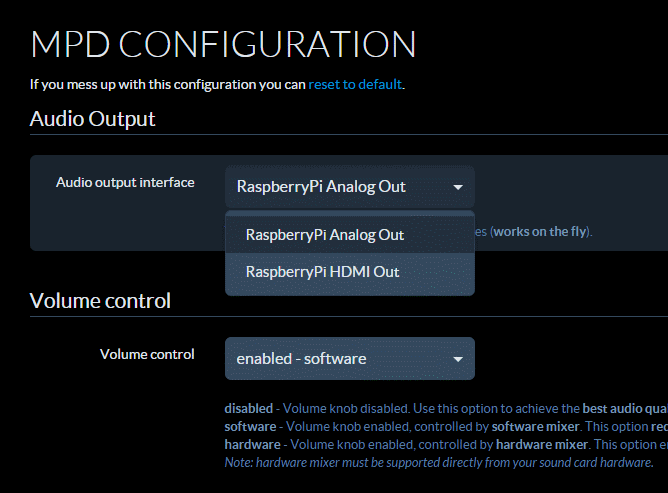
4. Go to
http://runeaudio.local/mpd , select the
HiFiBerry DAC+ audio output and configure the volume control as
"hardware"
Enjoy your HiFiBerry DAC+ with hardware volume correctly enabled.
Simone.