pacsabi
I can connect with any device to airplay and it seems working but no sound on Hifiberry Digi
jnfindley
I'm having the same problem with a Raspberry Pi Model B connected to a PCM2704 USB DAC sound card that works with music on a flash drive.
jnfindley
jnfindley wroteI'm having the same problem with a Raspberry Pi Model B connected to a PCM2704 USB DAC sound card that works with music on a flash drive.
I tried it again this morning and found that when I am using AirPlay that the audio is coming out of the Pi's analog jack (low quality), not the USB DAC. Does anyone have a link to a thread with a solution to this problem? I've tried searching for AirPlay, but did not find anything useful. This thread is the closest match I could find. Thanks!
Baloothebear4
Hi,
I have been using the 0.3 beta version on a wired LAN, connected into an ARCAM irDAC on a RiP B+ with a Samsung class 10 microSD all powered from an iPad (i.e. 12w) PSU. Some things work well e.g. Web radios, file find and stream from Mac OS X, last FM. All with very good quality. However, Spotify does not work (at all), also I have had the connecting issue shared elsewhere where the circles go around endlessly. The "git pull" fixes have helped. However, the build does not seem very stable and requires a reboot after 30-60 mins or so of use.
My main issue is that Airplay, through the irDAC works but is very distorted - the only way I can describe it is that the music is mixed with a loud buzz that chops up the sound. I have also tested the analogue output - this does work however, undistorted? Also Volumio works fine on Airplay so it is Runeaudio SW issue. The DAC sounds great for web radios and files from the NAS so its not the DAC, just Airplay which I was the main reason for getting into all this.
I hope there are some suggestions or fixes out there as I think Runeaudio has great potential and much prefer it to Volumio.
Thanks
jnfindley
I finally got AirPlay working with my Raspberry PI and USB DAC. I updated RuneUI, and set the output to my USB DAC, and then it worked just fine. I'm quite pleased now.

dimmuboy
In my case I can't see airplay from my android device. I used AllStream app but it search only DLNA source.
grahamnewman
@[deleted]:
I have exactly the same issue with 0.3 beta version on a wired LAN, connected into an ARCAM irDAC on a RiP B+. The Audio sounds dreadfully chopped up.
alxjalmeida
I just got things running last night: RuneAudio 0.3 Beta, RPi B+ Model, Peachtree Audio DAC connected via USB 24bit/192Khz.
Playing 24/96Khz content works great from USB storage connected to Pi, but running Airplay content to the RPi works but the sound is very very distorted and unlistenable like others have noticed on this thread.
I simply wanted to add the "me too" as I am new to RuneAudio and this is the only problem I am currently experiencing.
But overall love this project fantastic software and the Pi is perfect for this type of device!
zauberflote
Hi All,
I have recently installed v.0.3 beta on a Raspberry Pi B, connected (USB) into a NAD 1050 DAC and wifi. I really like its simplicity and overall sound quality. Being a user of other HTPC systems (Openelec. Raspbmc, Volumio), my first week with Rune Audio has been good enough to become my 'audio project of choice'. Congratulations for the dev team! And it is still a 0.3beta...!
After some tweaks and lots of googling, I also managed to configure a reasonably stable wifi connection with static IP. Majority of functions are working ok, including added web radios and file streaming (mostly 16/24bits, 44.1kHz) - partially limited by samba/NFS shares issues (ghost mounts / wifi), already discussed in other posts.
However, I'm also experiencing the same issues with AirPlay posted by other users: although discovery and connection are immediate, the sound is very distorted and AirPlay becomes non usable. I've tested different devices (iphone, ipad) and systems (iOS5.1 - iOS8.1), with the same results - no success.
I'm also looking forward to suggestions and/or fixes, as I'd like to have the flexibility of AirPlay included in my setup.
Thanks!
robertinjo
I can confirm that, AirPlay is really muffled.
Bobby
Hello -
Similar situation here. AirPlay works with analog output only. When using regular streams it goes though USB to DAC like I would like it to, but when AirPlay stream is detected, analog only. Looks like jnfindley got it to work. I'm trying to understand how to force output through USB only. Thank you
Klausi69
Hello,
I use Runeaudio
nightly builds, but I'm still unable to use Airplay stream for my HifiBerry DAC. iTunes seems to work, but there is no signal output to my amp. Has anyone of Airplay users solved this problem? Playing webradio etc. works perfectly.
hondagx35
Hi Klausi69,
please try this:
- when in Airplay mode go to the MPD settings page
- change Audio output interface to something like "Analog out"
- change the output back to your desired one for example "HifiBerry DAC"
- to Airplay
- activate Airplay again and you should have your DAC playing
- you have to do this only once
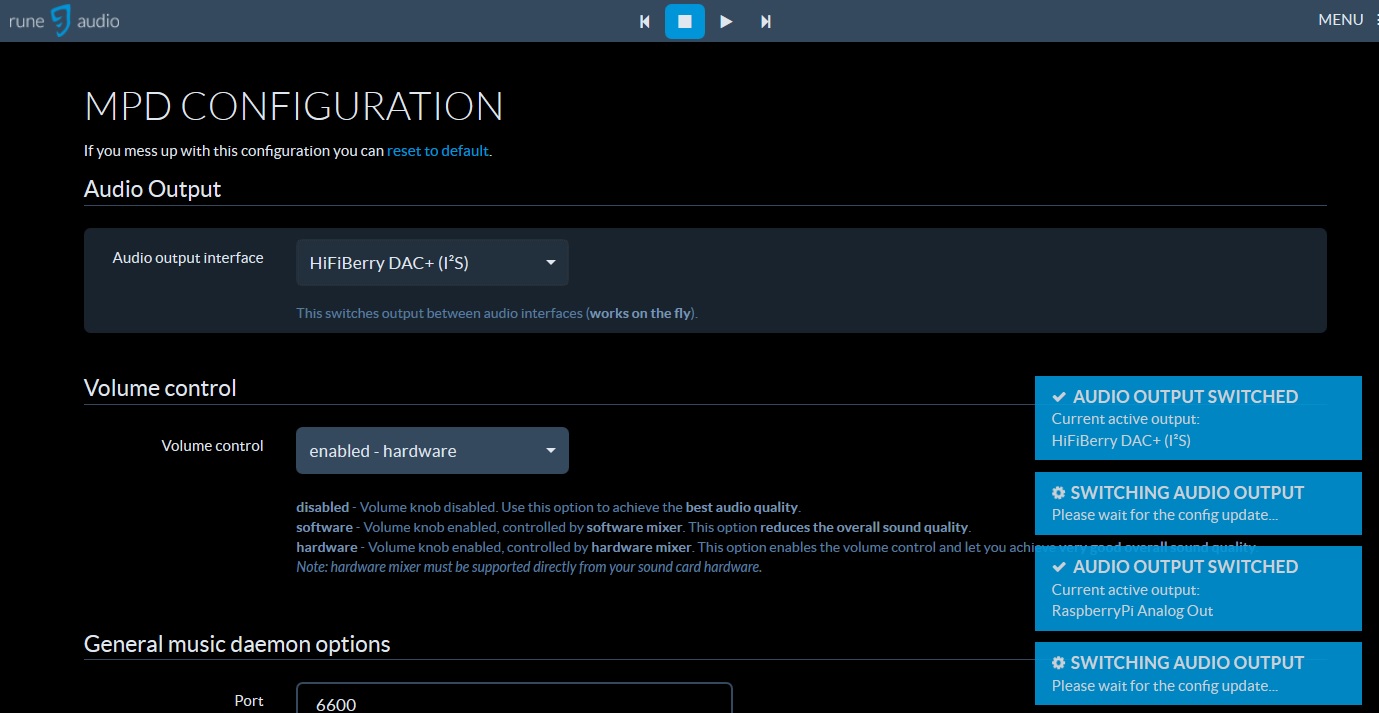
- airplay-audio.jpg (154.63 KiB) Viewed 5242 times
Frank
Klausi69
Thank you very much for this hint. It works like a charm.

domisol
still doesn't work for me, including after testing this workaround...
my configuration is Rapsberry + HifiBerry digi+
thanks for any hint
jean-david
domisol
ok, sorry, it finally does work, not sure what I changed, but anyway. Still got this annoying 2 sec delay, but I guess this is an airplay limitation.
morbus
Hello!
First I want to thank the rune-team for this very nice package! At this moment I'm trying to find the right solution for me. There is a raspi 2 model B with a pair of KEF X300A (built-in DAC) and I want to use it with USB, NAS and Airplay. So far I tried Volumio, RuneAudio, PiMusicBox, Archpile and moodeaudio and RuneAudio seemed to best fulfill my wishes. Mainly because it is beautiful und easy to use with some tricks like USB-automount besides other stuff.
Now the BUG:
Despite the trick posted above, volumio is the only one that gets Airplay to work without distorted sound as described above. Maybe this is some sort of information for you that helps you to find the reason of that problem. Volumio is no bad solution but for my point of view RuneAudio is the better choice.
Regards
morbus
chrisboll
Hi
I'm new t o Raspberry pi and Runeaudio but after only a weekend of tinkering I have got a VERY sweet setup - using the analog 3.5mm output atm until my USB DAC arrives.
I have mounted my music library on my NAS - only slightly tricky
And AirPlay is working like a dream
This is amazing and I certainly will be growing my system
Many thanks to the Runeaudioans for making so much magic happen!
krono86
Hi guys.
I'm testing in parallel Volumio and RuneAudio. I notice that RuneAudio is faster and more customizable than Volumio.
I'm using runeaudio on a raspberry pi 2 model B with the internal audio output untill hifiberry DAC+ pro will be shipped.
My main problem with RuneAudio is that when I try to use Airplay from my macbook or also from my iPhone I'm not able to get connection. The same function sounds like a charm using Volumio.
What's the problem?
Thank you for your work.
Ivan
P.S.
I'm Italian too!
chrisboll
hey krono86
yes Runeaudio is more adaptable than Volumio IMO
My experience with Airplay - with iPhone 5S it WILL connect but has a habit of dropping the connection; not sure ifit's part of a power saving thing or if it's general Apple flakiness. Apple stuff since IOS 9 and Apple Music is VERY MUCH a work in progress - they will get there but they WILL loose many people on the way
Airplay from my windows 10 laptop - rock solid and sounding great
