Just some update, I didn't know I could use windows share to peer into what runeaudio was doing, I just found out I could. I logged in from windows file manager and saw it had mounted my NAS, I thought well, maybe we can try something if we could see what's going on.
So previously I mounted volume1/music/ and runeaudio acted as if there's nothing there, while volume1/General Data Dump/Music worked just fine for some reason.
So I kept the working mount and added an additional mount for volume1/music/ to see if I can see rune audio mount or if it failed to mount or something wrong. Well well, it mounted it just fine, I can see all the files, and I played the file on my PC (so the file goes from NAS -> Rune Audio -> my PC), and it worked just fine...
However, runeaudio still refuses to read it... I'm baffled, since all the file appear fine, no restriction I can see at all... Everything is connected to my gigabit switch, so speed should not be an issue at all.
I just don't get it, why both directory mounted fine, I can even leech all the file through runeaudio from my PC, but runeaudio just would not scan or read file from that directory.
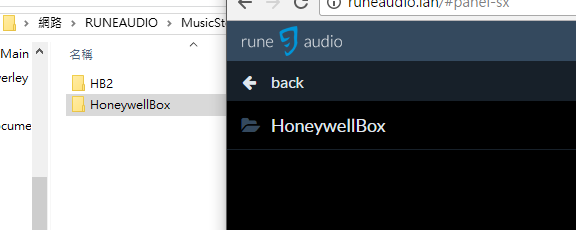
You can see in the attached pic, runeaudio just won't show the newly mounted (about 15 minutes now) HB directory in the web interface (it did show two NAS sources, but when I clicked it, only HoneywellBox is displayed).
Any ideas at all??
- Attachments
- Runeaudio-NFS.png (12.46 KiB) Viewed 2491 times
