ajmartin
Hello,
Using a PI 3 , downloaded the latest available Rune SW from Rune site last nite ( 12, Dec, 2016). Windows 8.1 OS
I can connect to Rune on my PI using static IP (192.168.1.60) I am able to see and configure everything except when I try to add network mount. I get the error: mount error(13): Permission denied Refer to the mount.cifs(8) manual page (e.g. man mount.cifs)
To share the file I right clicked the Music file then shared , then Advance share and shared , selected Everyone and clicked ADD, done. Looking at all shared files on the network my Music file is listed. In share my network path is listed as "computer name" \Music. I have tried putting in just \Music in Rune path , tried Music with no \ , Tried the entire path \user\ajmartin\Music,. I have deleted the Mount and started over many times. Rebooted the PC , rebooted the PI, Re loaded the Rune Image from a fresh down load and SD image. Searched the web but nothing works.
Please help,
Alan
hondagx35
Hi Alan,
please try:
* IP address
192.168.1.xxx (IP address PC)
* Remote directory
Music
* Guest access
tur this off and use your user and password from your PC
Frank
ajmartin
Hi,
Thanks for the quick response, 192.168.1.60 is the static address of the PI, the directions I was following said to use ipconfig and get the address of the PC the shared file lived on. I will try your suggestion when I get home today.
Alan
ajmartin
Frank,
One more thing. I do not have a password set on my PC it just come on and boots up.
Alan
hondagx35
Hi Alan,
192.168.1.60 is the static address of the PI
sorry my mistake, you have to use the address from your PC instead.
Frank
ajmartin
Frank,
Ok so I have done every thing that you listed, I did a web search on the error code and it seems fairly common in Linux , just not related to Rune that I can seer. Any other thoughts for curing this?
Alan
surfninja
Alan, probably the easy way is to add a username/password to your windows 8.1 system. Or you might be able to allow guess access to your share (I'm just guessing since I don't have win8.1).
I did the first but my music is served up from a linux system.
hondagx35
Hi,
please try this
http://kodi.wiki/index.php?title=SMB%2FWindows&diff=98237&oldid=96377#Windows_8.1_modification
With user and password it should look like this
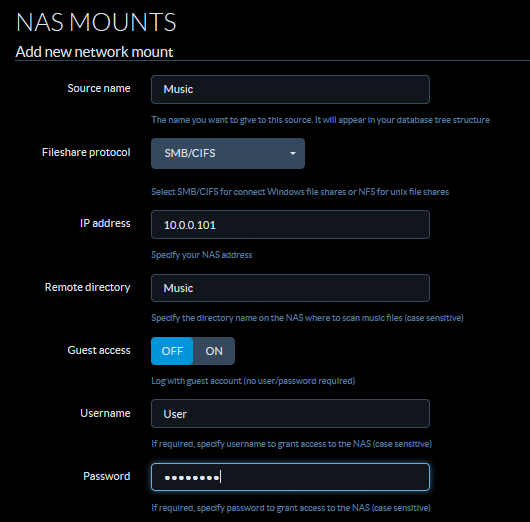
Without user and password leave the guest access on.
Frank
ajmartin
Frank,
Thanks for the help! I had already figured out the FIX though about 2 hours ago and have been playing with Rune since. I just needed to make ONE change, that is in Network settings, shared files and folders, turn off the selection that ALL users sharing your folders NEED to have passwords. My system does not require a password and I set it that way on purpose. What through me off was when I set my folder to share , windows came back and said "you are now sharing this folder" Nothing about needing a password.
Thanks again, I am sure I will have more questions as I get further into RuneAudio on my PI 3.
Alan
surfninja
Alan, thanks for posting a response that you got it working. Similar permission problems happen a lot and hopefully someone with issues will find your post helpful.
