zomtec wroteStert wroteSecondly volume controls do not work as the DAC has no software volume control ...
Have you a solution for the volume control?
First of all: Thank you very much for this wonderful piece of software you make!
I had similar problems with volume control, using RuneAudio v0.3-beta with a Hifiberry AMP+ and Spotify Connect 0.0.4-alpha. Changing the volume in the Spotify App did not change the volume in RuneAudio.
So I made use of the
"--device" and
"--mixer_device_index" parameters and changed the mixer to
"Master".
With
"aplay -l" you should be able to recognize the right output device index (--device) and the right sound card index for the mixer (--mixer_device_index). In the
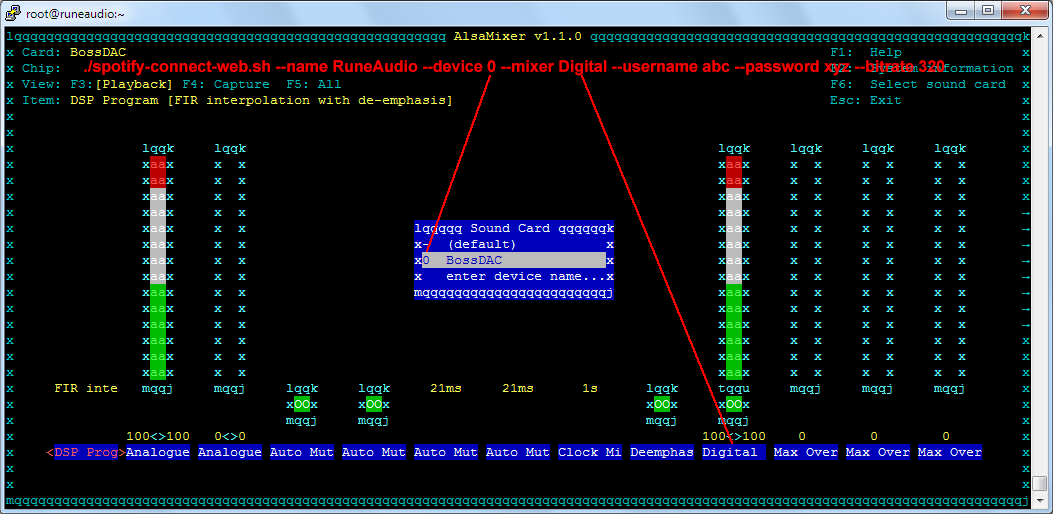
"alsamixer" view you can check which sound card is linked to the RuneAudio volume controls and how the mixer is named (usually PCM, Digital or Master)
For my setup it looks like this:
/root/spotify-connect-web.sh --name RuneAudio --device 1 --mixer_device_index 1 --mixer Master --username abc --password xyz --bitrate 320
Hopefully this will help someone with similar problems I had.
Fabian