Hi dror,
to get your RuneAudio puplic available you have to do:
- change your network profile to statis IP address
- go to your routers config page
- forward port 80 to your PI (static IP address)
- search for your public IP address 1)
- open your mobile browser
- navigate to
http://your-public-IP
- enjoy your public available RuneAudio
1) you can use something like
noip to get a fixed URL for your network (so called "Dynamic DNS")
Further readings:
https://en.wikipedia.org/wiki/Port_forwarding
http://www.noip.com/support/knowledgebase/general-port-forwarding-guide/
WARNING: From here your Pi is available for everyone who finds out your public IP!
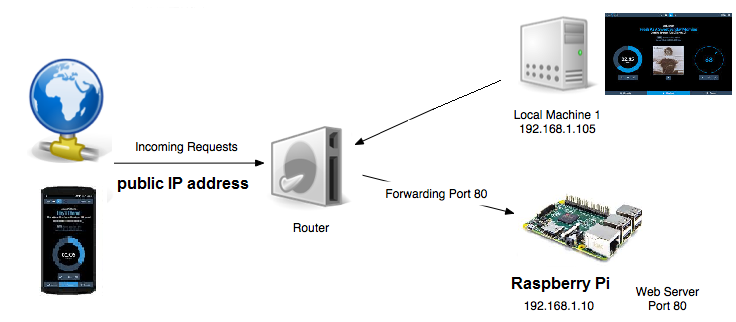
- public-RA.png (89.49 KiB) Viewed 1740 times
Frank

