SomeGuy
Hello all,
I have decided to move from Volumio to RuneAudio today due to the enhanced feature set RuneAudio offers however, it is not going well thus far.
Let me open up by asking you to assume I know nothing, to avoid any frustrations when I am unable to complete undertake any assistance offered.
The title says it all really, I am trying to mount, via NFS, a WD MyBookLive onto my Raspberry Pi/RuneAudio but all I get is this error, and after much searching there appears to be no solution available.
Please help me get off this endless merry go round.
Thanks in advance for any assistance.
RubiksCube
Could you post a screenshot of the mount settings?
SomeGuy
Sure thing, I've attached it I think.
- Attachments
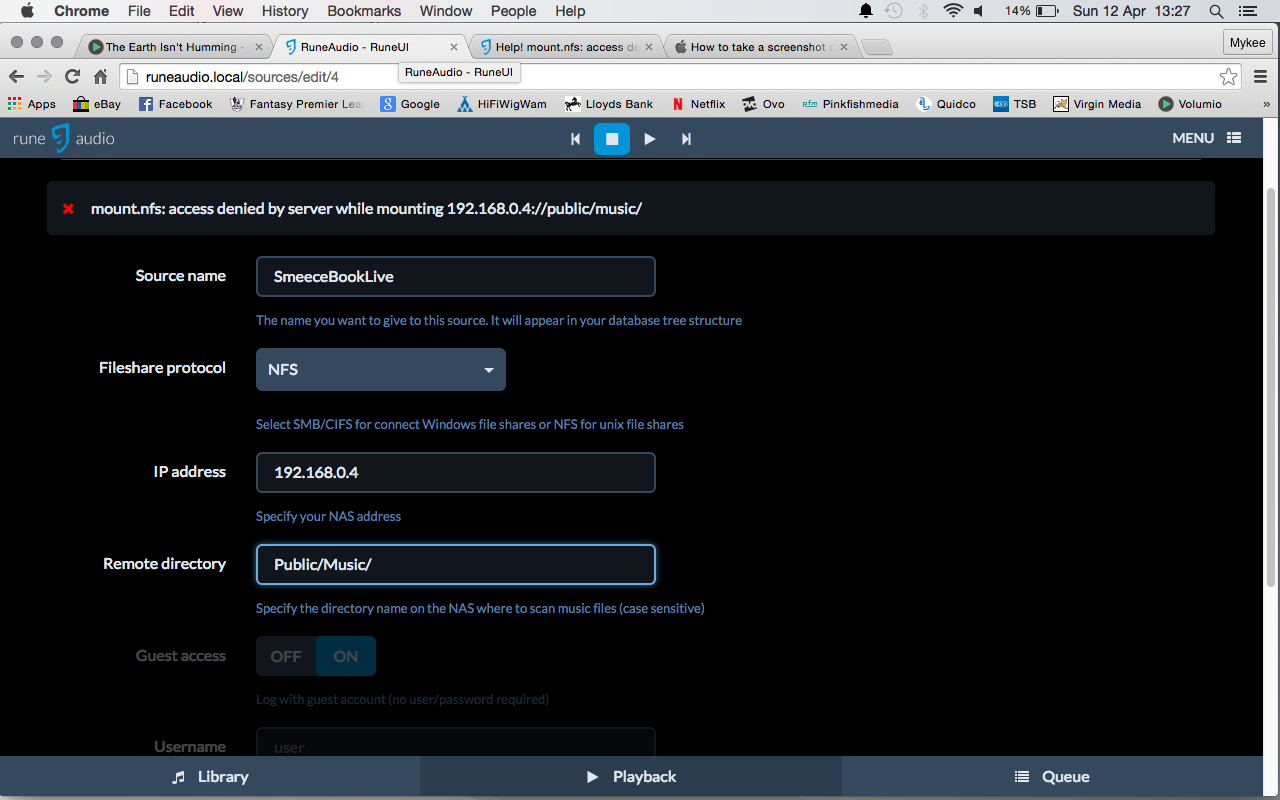
- Screen Shot 2015-04-12 at 13.27.16.png (198.37 KiB) Viewed 2737 times
RubiksCube
Try removing the last / on Public/Music/
SomeGuy
No dice, still won't mount.
RubiksCube
Are you sure you can use a guest access?
Edit:
Or try setting it as a SMB/CIFS share insted
Edit 2:
Or removing the cap'ed letters in Public/Music
SomeGuy
If I change to SMB/CIFS I get the following error message:
mount error(22): Invalid argument Refer to the mount.cifs(8) manual page (e.g. man mount.cifs)
I access the drive as a guest via other means so I presume I can do so here?
Changing from upper case to lower case has no effect either.
RubiksCube
Yeah I'm out of ideas, maybe someone with more Linux experience can help you.
SomeGuy
Thanks for trying!
SomeGuy
I can't believe no one else has had this issue before, this is incredibly frustrating!!!
SomeGuy
Error messages abound regardless of connection type.....
I'm using a Mac & my music is stored on a WD MyBookLive, should I be using SMB/CIFS, SMB/CIFS (OS X share) or NFS?
It seems I am unable to proceed regardless, the homepage makes this seem like a cakewalk.
SMB/CIFS - mount error(22): Invalid argument Refer to the mount.cifs(8) manual page (e.g. man mount.cifs)
SMB/CIFS (OS X share) - mount error(22): Invalid argument Refer to the mount.cifs(8) manual page (e.g. man mount.cifs)
NFS - mount.nfs: access denied by server while mounting 192.168.0.4:/Public/Music
ianhaynes
It's a long shot but I needed to access my NAS drive via name rather than ip address.
SomeGuy
Yeah, I tried that, but it wasn't interested then either. Thanks though.
ACX
I personally used a WD MyBookLive World Edition in the past and I was using that in NFS without any issue. Just configure the right permissions on the NAS, you have to specify the allowed IP addresses for NFS.
SomeGuy
Thanks for helping out.
I've just been having a look at the MyBookLive & I can see that Volumio is currently showing as a MediaPlayer under the DLNA section:
Volumio: root Windows Media Connect compatible (MiniDLNA) b8:27:eb:ef:b4:37 192.168.0.x
Is this likely to be blocking access from RuneAudio (same IP address) & if so, how do I get rid of it?
SomeGuy
I'm now up and running after starting over again. No idea why but it went swimmingly. Thanks all for your attempts to guide an idiot through this.
Diskdoctor
In case it's of help to others:
I was having similar issues mounting my WD My Book Live. By adding nfs to the "remote directory" path I was able to mount it as NFS. So my runeaudio settings look like:
Fileshare Protocol: NFS
IP address: SmithMyBookLive
Remote Directory: nfs/Public/Shared Music/
Aquarius
I also had issues with NFS when setting up Rune/Volumio/Moode etc..
Only Samba did the trick.
However, when chosing samba, go down to the "advanced" section and be sure to remove the options that may be hidden there. If I remember correctly, those are NFS options only and will be rejected by mount.cifs.
It solved my issues.
silvrr
How is the my book connected?
